web analytics
Dec
29

Attend BlissDom Blog Conference – Ticket Giveaway!

I went to BlissDom Blog Conference last year and spoke at one of the Wisdom Workshops. It was a fabulous experience and the entire conference was not only educational, but an amazing experience. BlissDom is a conference that pampers it’s attendees with great entertainment, fabulous keynotes and an amazing atmosphere.

I’m looking forward to this year’s BlissDom because I’ve seen the conference schedule – the content this year is going to be amazing. I’ll be speaking with Melanie and Shelley in the SEO and Stats – Blogging with Strategy Wisdom Workshop. I’m excited to share more about how to blog smart with you guys.

And on that note – Who’s coming to BlissDom Blog Conference with me? What’s that? You don’t have a ticket yet? That’s ok – I have one for you. One lucky winner is going to win a Wisdom Workshop and Full Conference Pass ticket to BlissDom 2011!

How to enter?

Required Entry – Be subscribed to the newsletter either on this website(Topics – writing/blogging/making money online), or on Untrained Housewife(topics parenting/home management/back-to-basics).

Be sure to leave a comment to let me know that you are a subscriber!

Additional Entries –

1. Subscribe to another newsletter. (leave a comment)

2. Tweet about this giveaway. (leave a comment – one per day)

3. Share about this giveaway on Facebook. (leave a comment – one per day)

Sample tweet or Facebook message “I want to go to #Blissdom with @AngEngland! http://bit.ly/BDTicket”

Winner will be randomly selected from entries received prior to January 5, 2011 at 11:59pm CST. Winner is responsible for any expenses associated with travel, hotel or attending the conference. See you there!

Want another chance to win? Visit my friend Heather Solos at Home-Ec101 who is also hosting a giveaway opportunity!

This giveaway winner was Valerie who attended BlissDom – I was so happy she had a chance to do so.

Dec
18

How to Add Niche Newsletter Autoresponders Using Mailchimp
This screencast will cover how to create targeted autoresponder newsletters for your subscribers via Mailchimp. I love mailchimp because you can start out at a free level while building up your newsletter subscribers. I only wish that I had set up a newsletter for my websites much (MUCH!) sooner. Do not make my mistake – go to Mailchimp and get an account for your blog immediately.

Why Use Autoresponder Newsletters For Your Readers?

In the screencast video you’ll see step-by-step one way I might set up an autoresponder for the niche topic newsletters I’m just creating for Untrained Housewife – in this case, Menu Planning, Recipes and Meal Prep. It’s a good way to include affiliate links while providing GREAT content for your subscribers: I’ll be highlighting archived articles that might otherwise be overlooked and be able to group similarly themed articles written by multiple contributors (in this case when I finished polishing I pointed readers to three pizza-related articles on Untrained Housewife). I will also be including lots of newsletter-only content.

Steps to Creating An Autoresponder in Mailchimp

1. Log in and click on the Autoresponder tab in your Mailchimp dashboard.

2. Click “Add Autoresponder” and Title your autoresponder. This is the title YOU will see, not any of the people on your list.

3. Once you’ve created your autoresponder, create the email (use the quick links under your newly created title)

4. Select the group or list segment you want the autoresponder to go to. In this case, I’m selecting specific list segments based on who signed up for the additional resources group on the Untrained Housewife newsletter subscription page.

5. Select the template or create your email and enter your specific copy. In this case I found a couple other articles about pizza and made the content section bigger so it’s balanced with the sidebar ad.

6. (not shown on the video) Click NEXT just above the editing screen. Click Copy from HTML. This creates a plain text version of the newsletter or autoresponder so that people who request plain text emails will still get the mailing.

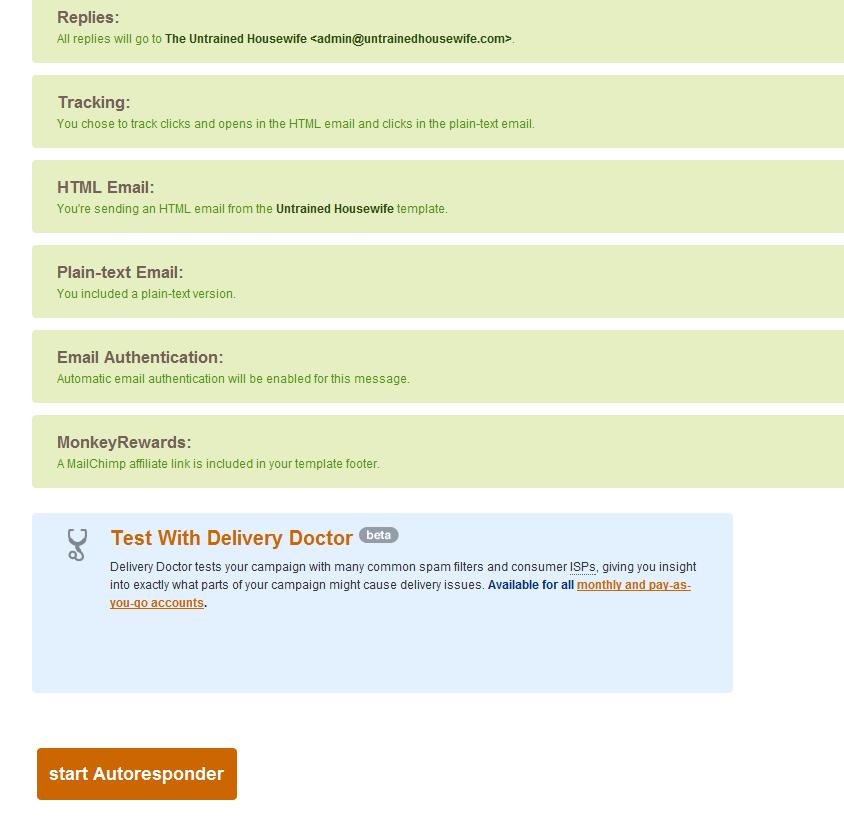
7. Keep clicking next and double check that everything is how you want it. Watch your reply to email in case you want a different email than the one you signed up with. Click START AUTORESPONDER (see orange button in image) and your autoresponder will “turn on” and be ready to mail out as soon as the selected parameters are met. In this case – as soon as a subscriber reaches their 60th day, viola (!) this email will appear in their inbox!

Affiliate Programs I’ve Used

Linkshare is the affiliate program I demonstrated in this screencast. It’s easy to use and has a wide variety of advertisers involved. This and Share-A-Sale are the two I’m now using most frequently.

Commision Junction is another one I’ve used with fair success.

Share-A-Sale is something I’ve recently joined when I joined the Headway Themes affiliate program (the theme I have on Untrained Housewife) and I’ve had very good success through them so far. Better than any of the other programs I’ve tried, although the Share-A-Sale site is a bit harder to navigate than Linkshare.

ClickBank has a lot of digital products, but didn’t work as well in my own experiences.

Note that some links in this post may be affiliate links.

Dec
10

Teaching Social Media Classes for Local Businesses – Type-A-Parent 2010 Conference Recap

Sarah Pinnix Teaches About Social Media Classes

Woefully late, I know but between traveling, school with kids and the hacked website, that’s just the way it is. Better late than never, don’t you think? These notes are from @RealLifeSarah‘s session at Type-A-Mom (Now  Type-A-Parent) Blog Conference.

Social Media 101 by Sarah Pinnix

Learn about marketing! Meatball Sundae and UNMarketing are good resources. You have to understand the principles of good marketing.

Establish yourself as an expert – find out what you are doing that is newsworthy and relevant in your community. Get in the news – use press releases or establish reporter contacts in your local community.

Become the “big fish” in your little pond instead of aiming for a saturated national market.

Start promoting your local businessess on your social media outlets. Then tell them you’re doing it! Don’t be afraid to contact someone and say, “I wanted to let you know I mentioned you in my Facebook status message recently.

Offer to help someone for free. Get your feet wet with a business owner friend or an establishment you frequent regularly. Track everything you can to build a portfolio for future businesses.

Start a local blog!

Workshop dates and topics -

Free seminar first to get them in the door. See about sponsors for the local workshop. Teach philosophies of social media, share case studies (Mashable), etc. Teach about blogs and social media and quick updates and usability – dynamic and updateable content. Power of the RSS feed and permission-based marketing. (Illustration of the ball and expectation and not expecting)

Facebook 101 – Stay on top of new rules and regulations. If you are interacting you’ll be seen in the facebook statuses. Must interact. Must get your updates seen to be effective.

Twitter 101 – Informational – give the info and send them on their way.

She spaces the sessions out by a month to give time to implement.

Integrating social media into existing web presence – the Transformational stage.

Individual class = $75, 3 session pass is $60 each or 5 for $55 each.

Private Consulting for Businesses – A Few Tips

  • Listen First
  • Find out their specific marketing goals
  • Craft a step by step plan to help them achieve that goal
  • Suggest ways they can go beyond their stated goals
  • Do research beforehand, and write a written report with your recommendations**
  • Set rates based on your area’s market
  • Be the Devil’s Advocate

**I want to add a note here. I have personally taken to charging for in-depth analysis reports, especially those that require anything more an hour of my time to put together. I’ve had two situations where I did not charge, hoping for a payback later and in both cases all my action steps were implemented (poorly) by someone else.

By charging my hourly rate I am able to turn over the report feeling fairly compensated, while establishing a base-line of credibility with the business I’m working with. If they choose to hire me later, that’s great (and has statistically happened MORE often when I charge for the reports). But if they don’t choose to hire me later, I can be free from any lingering resentment.

Photo by @Mooshinindy

Nov
30

SEO Basics for Blogging – Writing for Google Traffic Without Losing Readers

This post is written as part of The Blogging Mavens blog series which you can see the rest of at A Closet Writer.

There is a delicate balance between using basic SEO principles to bring in the search engine traffic you should be seeing on your site, and “writing what you want to write”. Many bloggers are under the misguided opinion that being aware of SEO will be selling out from their writing and their audience. I disagree – knowing how SEO works will enable bloggers to FIND their audience. Or rather, to help their audience find them!

The ABC’s of Good SEO Writing

When I’m talking about search engine optimization, especially with beginning bloggers or those who are just learning about SEO, I like to talk about the ABC’s.

A = Active Titles: Call the post what it is. Titles are one of the key elements on the page that Google checks when determining what the post is about. If your post is about making homemade pizza, call the post “Making Homemade Pizza” and you’ll bring in the right readers.

B = Bolded Subheadings: Use subheadings like mini-titles to describe each paragraph or two so Google, and your readers, know what you’re talking about. That way Google can send you the readers that want to hear what you have to say.

C = Cut Away Fluff: With very few exceptions, it’s better to write multiple, shorter posts, than it is to write one gigantic post. Don’t cram the homemade pizza, the delicious dessert and the family fun night game into one 1500 word post. Make them three 400-500 word posts and give your readers more opportunity to find you.

Moving beyond the ABC’s of good SEO there are a few other tips to keep in mind.

Additional Ways to Increase SEO on Your Blog Posts

Here are a few other ways to improve the SEO on your blog posts and articles. While I go in-depth into each during my talks at conferences, I want to just highlight them here for you. If you have questions, let me know.

  • Name your photos with a strong keyword phrase.
  • Use image alt text and/or captions to improve your post’s SEO.
  • Interlink relevant posts from within your website.
  • Crosslink to relevant content on other sites (your own as well if you write in more than one place).
  • Register your own domain name.
  • Get rid of your clunky themes (sites that load too slowly are penalized by search engines).
  • Use clear categories and tags instead of cutesy and obscure.
  • Build incoming links to your blog. Consider linking to specific posts in addition to your main website.
  • Write, write, write. Fresh content gives you more chances to be found.

So when you’ve moved beyond the very basics of search engine optimization keep some of these other tips in mind. Use your keyword phrases wisely and remember that you can still choose to write about whatever topic you want to write about. By formatting the post with a few of these SEO tips in mind, you’ll bring in additional readers from search engine traffic you may have otherwise missed.

Nov
21

Internet Security for Bloggers

How fast could a hacker unlock your website?

Yes it’s been a little while since I’ve posted. That’s because my blog got hacked and I lost a lot of administrative functions on my site. In between that, and getting it fixed, I also traveled to and spoke at three different blog conference. Whew! I’m tired. And I have a lot to say. But I’m going to start with a word about internet security for bloggers.

Why is Security Important for Bloggers?

As I learned right after returning home from Type-A-Mom Blog Conference, even mid-level wanna-be-bigger bloggers are not exempt from hacking attempts. What I’ve found out since is that a hacker will often specalize in a particular type of hacking and once her finds a weakness in a particular area, in this case the theme I was using for this blog, he will have scripts that search automatically and try to break into your blog. It’s almost entirely automated. He doesn’t have to find my site and decide to try to “mess me up”…it just runs the program, finds my blog and begins it’s attack.

If I hadn’t caught the problem when I did it would have been much worse. So internet security needs to be a priority for everyone who has a blog or website of their own.

How can I Protect my Website or Blog From Attack?

1. Have a strong password. More about passwords in a second.

2. Update themes, plugins and your wordpress blog. DELETE plugins and themes you aren’t using from your dashboard. (Don’t just leave them inactive because the files are still connected to your database when you do that.)

3. Change your password every 30 days or so. If you’re using a good password that will theoretically take 80+ days to hack, changing your password every month keeps you with a very good chance of not being hacked.

How Fast Can Passwords Get Hacked? What Makes a Good One?

OK so this is a non-geek’s translation of what I learned at I_Blog Blogging Conference a couple weeks ago, hackers can break your password so fast. A “Class A” hack attack (Not sure what the actual name is) can crack most 6-8 digit passwords in less than a minute. Less than a second. And Class A was the slow one. Yikes! No wonder my little attempt at a pithy password didn’t hold up long!

To make a secure password have at LEAST 8 digits, 10 are better. And combine capital letters, with lower case letters, numbers and special characters (like _, &, or @).

By mixing it up, a hacker’s program would have to try many millions of potential combinations before hitting on your password and even with the higher level class of attack it would take days…months…..MUCH safer.

A huge thank you to Bryan Assata and Threshold Technologies for putting my website back to rights to quickly and ably. Much appreciated! As for my readers – more blog conference thoughts to come.

Sep
17

Interlinking and Crosslinking for SEO to Increase Rankings

This is a training I recorded for Blissfully Domestic and Untrained Housewife but I hope that many of you are able to benefit. Interlinking and cross-linking (what I call linking across multiple websites) can hugely benefit bloggers and web writers and I’ve given a few examples in my screencast below that you may find helpful.

Writing for multiple websites can be a challenge but there are benefits. When Google May-Day hit I found that Untrained Housewife traffic did not suffer at all, in fact increased slightly, while other websites were shaken up.

In researching some possibilities with a few good friends who are STARS with the SEO stuff, we concluded that linking in from multiple websites really matters more than ever. And interlinking to specific posts – not just main homepages. How does it work? Here I demonstrate two main ways to interlink around the web.

YouTube Preview Image

Sites and Resources Mentioned:

Sep
16

Turning One-Time Visitors into Loyal Returning Friends

Are you connecting with customers and encouraging them to make the leap?

You know how sometimes “real life” can teach you so much about business, marketing and things online? I had that experience recently when we signed our kids up for a Bible program called AWANA at a new church we had never visited before. Our first time there was to enroll the kids was on a Wednesday night and we had no intention of trying the church services on Sunday – we just wanted our children in the Wednesday night program.

Friday afternoon I got a letter from the pastor in our mailbox. Expecting the standard form letter “Thanks for visiting”, what I found was a much more personalized and heart-felt letter that has relevance to all of us.

He welcome us by name. He mentioned each of our children by name in the letter, and let us know who the teacher was in that age group, and what they were currently studying. He invited us to the small group session and let us know that we’d already met the teacher of the young marrieds group at dinner on Wednesday night. What his letter taught us about marketing and reaching out to first-time visitors is truly profound.

 Here are the takeaways:

1. Be Personal

Our family was mentioned by name. Our children were included and since it was obvious from our first visit that our children are important to us this was a huge plus to us. When you thank someone for a purchase or a visit or contacting you, do you respond personally? Or with a stock form letter?

1. Be Specific about What to Expect

In this case it was the mention of my children and their age groups that provided the specific details. Hearing their teacher’s names and lesson topics meant that I could prepare my children ahead of time if we chose to come. It made me feel like I already knew what to expect and so the fear of the unknown was eliminated.

People can come up with a hundred excuses to not go to your website, buy your product or hire you for a job. Often they boil down to not knowing what to expect – the fear of the unknown. The other is feeling a lack of connection to the company, brand or person. This letter from the church effectively address both of those major concerns in a very neat and concise manner. How are you doing?

Aug
30

Make a Blogging Plan – Day 31

Well we’ve reached day 31 of 31 Days to Build a Better Blog and you should find yourself with many tools to use on your blog. Some will fit better than others, some will be used more often. All are important parts of a good blogging arsenal.

One of the things I talked a lot about in my Ten Habits of Successful Blogging series was the need for a PLAN. And this is what the challenge today is about.

Get out your calendar. Makes a list of the blog related things you want/need to accomplish in the next month. And now start plugging stuff in.

If you have an hour every night after the kids go to bed to dedicate to working on your blog then you will look at your list and start planning what to do in that daily hour time frame.

Maybe the first day of the month will be a brainstorm session to create two or three dozen blog post ideas. Two days per week will be publishing blog posts. That leaves two day per week to promote your blog via Twitter, facebook, forum posts, and comments. And another day per week (excepting the first week) for site maintenance, guest posting or statistics analysis.

Or maybe your blog has a theme so you’ll be planning your Monday Marvels, Tuesday Tips, Wordless Wednesday, etc.

Or maybe you have private clients that you’ll need to schedule in research and writing time. Administrative tasks like pitching new clients, invoicing, etc.

Whatever your unique situation is, you need to include those tasks on the list for you to schedule in the time. I’ll be honest you guys. I hate schedules. I hate writing down when to work on what on the calendar. Mostly because I tend to fail within three weeks enough to just drop the system entirely.

But then the chaos is too stressful and I plan stuff out again and things are much better for a couple weeks again. Sad, but true. With four children and a husband who works odd days, that’s the simple truth of my life.

What I have found is that having a flexible, but outlined schedule tends to work the best for me. I can’t plan things down to the second because, well – dirty diapers happen. But I can plan a day-by-day plan that tends to be followed more or less. Email day (catching up on the emails that need to be addressed and weren’t taken care of right away), administrative day, writing days (I get two, sometimes three), etc. And I’m always sure to include a catch-up day that is for any extra projects or last-minute things that come up.

But that’s what works for me. The challenge for you is to discover your OWN plan and that will be uniquely yours because you are uniquely you in a unique blogging situation. But I’d love to hear about it!

Aug
30

Tracking Analytics and Reader Stats on Your Blog – Day 30

OK so you’ve been working through 31 Days to Build a Better Blog for 30 days now. How do you know whether of these improvement steps have been successful? How do you know who is reading your blog? How do you know which blog posts are the most popular? How do you know which blog posts need to be re-written or freshened up?

Your blog statistics.

You want to know your overall stats (ie number of visitors and page views), your most popular posts, what questions people are typing in to find your blog (often great future blog posts), referrals (what sites are sending readers directly to your site), your bounce rate (the percentage of people who visit a page on your site and then leave again immediately), exit page stats, and much more.

Some bloggers can get almost addicted to stats and get sucked into every little jump and wiggle. Other bloggers literally hate statistics and analytics and will never check their stats. I tend to fall somewhere in the middle. Personally I have become too lax about checking my stats because of the new baby, but as we’re settling into a routine with his eating and sleep habits I will be checking back in more frequently.

Before Adam was born I checked page views once a week minimum to see if there were posts getting an unusual amount of traffic suddenly, to see where that traffic was coming from, etc. I also check more in-depth at the end of each month, comparing this month’s numbers to last month’s numbers. This gives me a chance to notice where I have much higher bounce rate, or very low time-on-site and schedule a time the following month to brush up on those posts.

Beginning Bloggers – Remember that not all blogs have hundreds of thousands, or even hundreds of readers each month starting out. In the book, Darren mentions that two years ago he analized the top 100 blogs on Technocrati and found they had been up for an average of three years! Success with blogging takes lots of content, exposure, incoming links and all of that takes TIMES.

Set percentage based goals for yourself. For example you might adapt some of these ideas:

  1. I want to average three comments per post this month.
  2. I want to raise my page views by 10% this month over last month.
  3. I want to decrease my bounce rate by 5%.
  4. I want to gain five new subscribers to my blog this month.

Whatever your goals are you can use stats to find out if your outreach is successful or not. Don’t be afraid of delving into analytics a little bit, but be prepared to act on what you find.

Aug
29

Develop an Online Profile Strategy to Increase Exposure and Readership – Day 29

Day 29 of 31 Days to Build a Better Blog is all about utilizing your time wisely and effectively. Now is the time to begin to think intentionally about your time and energy online, and how these actions can promote your overall profile online. This is probably one of the best things for me when I do it consistently, and one of the hardest areas for me to remain faithful in.

The challenge today is to look at various ways to use your time online to promote yourself and your blog, apart from the time actually spent on your blog. The difficulty is that it can become so easy to “piddle around” as my mom used to say. To flutter from one thing to another to another to another and before you know it, you’ve spent an hour online and not really accomplished anything.

I think that’s where I come to a word that Darren doesn’t use in the lesson – intentional. Having planned your online actions out ahead of time can be very effective because you will stay on task, eliminate distractions and work more efficiently.

Ways to promote your online profile are numerous and several are listed in today’s post such as Flickr, Lifehacker, Twitter, Forums, Blogs, and StumbleUpon. He also discusses using guest posts, blog coments on other sites and advertising.

There are a few favorite ways I have to promote my blog online that Darren did not mention. Satellite blog posts like hubpages, squidoo lenses and xomba can be effective for creating incoming links and drawing in new readers. Contributing to collaborative sites like Untrained Housewife, Type-A-Mom or Blissfully Domestic can be beneficial for lifting a series of posts on a topic across several sites and harnessing Google Power in a big way.

For example, when I wanted to promote and build up my series of articles about fragrant plants on Suite101, I wrote a fragrant plant themed hubpage linking to it, used my personal plants blog to link to it and shared the links via Facebook, twitter and stumbleupon. If I wanted to take it one step further, and I probably will eventually, I would write a couple gardening articles for Blissfully Domestic and Untrained Housewife and link back to the fragrance articles on Suite101 from within those posts. Now Google sees at least a half dozen incoming links to my fragrance plant articles and some of those links from full-length articles – that gives tremendous power to my search-engine rankings.

Another way to build up an online profile that Darren didn’t touch on would be twitter chats. Many topic areas now hold twitter chats with relevant hashtag marks. For example #blogchat, #gardenchat, #birthpros, etc. Almost every topic area has chats dedicated to it now and if they don’t…what a wonderful opportunity for you to step in and become “the founder of #cookbookchat”.

Challenge:

  • Assess the amount of time you are willing and able to dedicate to promoting your blog and online presence. Remember this will be above and beyond your actual writing, publishing and site design for your blog.
  • Schedule your allotted time according to what will benefit you the most – X amount on Twitter, X amount in extra postings each week (whether that’s Hubpages or guest posts on collaborative sites, etc), X amount commenting on forums/blogs, etc.

Do you think that this is a beneficial exercise? Even if you are typically a “fly-by-the-seat” type of personality, do you think having a social media and promotion strategy will be helpful? What types of things have you done in the past that have proven the most beneficial to you in building an online profile and increasing awareness of your work?